The features of Genofeld
Genofeld draws genograms – no more and no less. It knows the symbols and lines used in genogram work, takes care of the alignment if you want it to, and exports the drawing in the formats you need for a case file, coursework or a printout. Everything runs in your browser, without signing up.
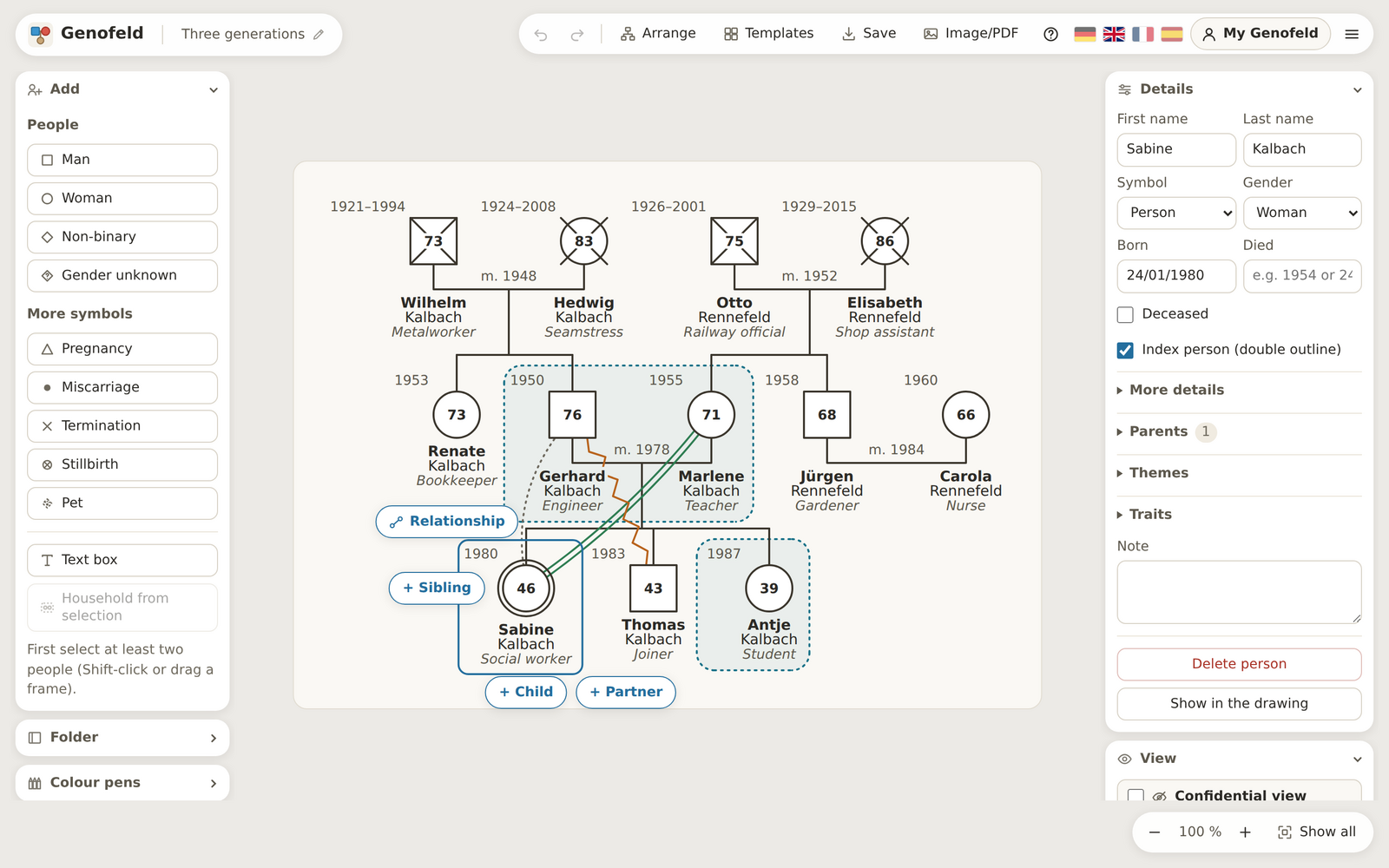
Drawing while someone is talking
The selected person shows the buttons “+ Partner”, “+ Child”, “+ Parents” and “+ Sibling”; one more, “Relationship”, draws a line to another person. You type names directly at the symbol, and dates also accept “1954” or “around 1890”. This way, three generations take shape in a few minutes, without you taking your attention off the conversation.
As for the layout: whatever you have moved stays where you put it. On request, the “Arrange” button sorts by generation and birth order, eldest children on the left – and it can be undone.
Everything that belongs in the picture
People as a square, circle or diamond, the index person with a double outline, deceased people with a cross, pregnancy and pregnancy loss, pets. Couple lines for marriage, partnership, engagement and affair with years, separation and divorce. Child lines for biological, adopted and foster children, twins and multiple births. On top of that, the relationship lines that set a genogram apart from a family tree, traits for illness and addiction, and households as a dotted outline. The legend builds itself. Every single symbol and its meaning is listed under Genogram symbols.
Two aids for the conversation come on top: colour pens, with which you lay a theme over the family in the words of the person you are talking to, and the “Cultural background” view for the cultural genogram: groups in the family’s own words, with the fill of the symbols showing the shares.
Two views that help with understanding
The chronology puts births, deaths, marriages, separations and your own events in time order and gives the age of the people involved. “Patterns” collects factual pointers: the same first names across generations, the same age at death, separations in successive generations. These are pointers for asking further questions, not interpretations.
The features in detail
- Symbols and linesPeople, couple lines, child lines, relationship lines, traits – and the legend that goes with them.Find out more →
- Send to the boardMark people, and they are ready as figures on the Parafeld System Board.Find out more →
- Quick drawingFour buttons, names right at the symbol, keyboard shortcuts – and “Arrange” as a step of its own.Find out more →
- Confidential viewHide traits, causes of death, themes and sensitive lines, with names as initials.Find out more →
- Chronology and patternsEvents in time order with ages – and pointers to what repeats.Find out more →
- Saving and exportingFolder, file, PNG, SVG, PDF without a watermark – and reading and writing GEDCOM.Find out more →
What is free to use
Everything described on these pages: all symbols, all lines, chronology and patterns, the confidential view, saving as a file, image, vector graphic and PDF without a watermark. There is no payment function, and an account is optional – what may come later: see Pricing. Which of these matter in which field is shown on the Use cases page; seven invented example families are available under Templates.
If something is missing
Genofeld limits itself to what a genogram needs. If your work calls for a symbol, a type of line or an export format that is missing, write to service@genofeld.de. If several users ask for the same thing, we will build it in.