Genofeld on a phone and a tablet
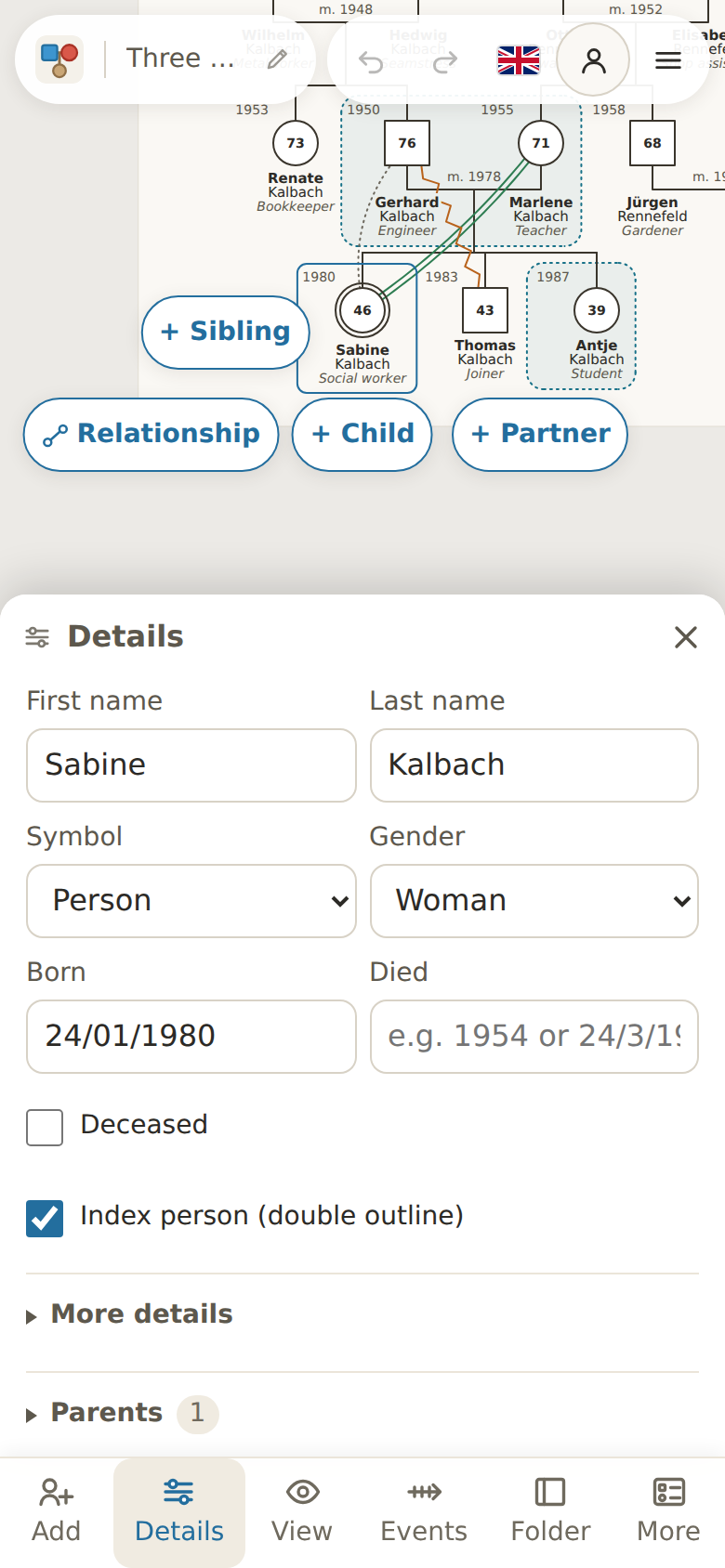
Genofeld runs in every current browser, on a phone too. The interface then rearranges itself: instead of two columns on the left and right, there is a bar at the bottom and sheets that open from below. You can draw everything with your finger.

The bar at the bottom
What is in two columns on a computer, you reach here through six buttons along the bottom edge:
| Button | What is behind it |
|---|---|
| Add | adding people and other symbols, text box, household from selection |
| Details | the details of the selected person, line or household |
| View | the switches, including the “Confidential view” and the names |
| Events | the Chronology: the events in time order |
| Folder | your genograms, opening and saving files, GEDCOM |
| More | Legend, Patterns, Colour pens, Cultural background, Templates, Image/PDF, Send to the board, Help |
Each button opens a sheet from below. It takes up at most 55 per cent of the height, and the drawing moves up far enough for the selected person to stay visible above it. Pressing the same button again or the cross at the top right closes the sheet.
Drawing with your finger
- Tapping selects a person. The buttons “+ Partner”, “+ Child”, “+ Parents”, “+ Sibling” and “Relationship” appear next to them – no sheet opens, and your eyes stay on the drawing.
- Double-tapping opens the “Details” sheet for this person. That is where the name, years and everything else are.
- Dragging on an empty area moves the sheet, two fingers zoom in and out.
- Dragging a person moves them; they snap to the grid and to the height of their neighbours.
- A long press opens the context menu – the same as a right-click on a computer.
- For a relationship line, tapping is easier than dragging: once on “Relationship”, then on the second person.
At the bottom right is the zoom bar with “−”, “+” and “Show all”. All touch targets are at least 40 px in size, so that you can hit them on the move too.
What works better on a large screen
A genogram over three generations needs space. On a phone you see either a section large or the whole thing small – the drawing does not get smaller than half size, because the labels would otherwise no longer be legible. For a session with clients, a tablet or a computer is therefore more comfortable; on a phone, adding things in between, looking something up and showing a section work well.
On tablets and in narrow windows under 1024 pixels wide, Genofeld works with the same bar as on a phone. That is deliberate: next to two columns, too little would be left for the drawing.
Remember
On a phone too, without an account your genograms are stored in this browser – on this device. If you want to continue working on them on a computer, save them as a file and open it there – or move them into the optional account and sign in on both devices. If the phone clears the browser storage, the work is gone. So save what matters to you via “Folder” and “Save as file”.
There is no app from an app store, and none is needed; many phones can put the page on the home screen as a shortcut. Everything else you can operate is described under First steps and Keyboard shortcuts – the latter apply as soon as a keyboard is connected to the tablet.